For Indigenous Organizations and Communities
Your Nation's records, in one place you own.
Member lists, documents, emails, maps and recordings often sit in five different places. SovereignD puts them together so staff can find what they need. It runs in Canada, and the data belongs to the Nation.
- Hosted in Canada
- No price per person
- Export everything, any time
- ResolutionBCR 2019-014 · Aspen Lake cabin leasesBand Council Resolution · PDF · 12 Mar 2019
- DeadlineReferral: timber harvest near Aspen LakeProvince · map attached · response due 3 Nov
- StoryElder interview, 2016“…my grandfather trapped at Aspen Lake…” · 1:04 in
- PlaceAspen LakeInside the traditional territory · 3 trapline areas
Sound familiar?
The work is hard enough without hunting for files.
Things we hear from band and consultation offices.
Where the records are today
- The lands manager's old inboxthey left in 2021
- Shared driveBCRs › 2019 › BCR_014_FINAL_v3.docx
- Membership_2019.xlsxonly one person can open it
- Binder: treaty annuity paylists1950–1985, in the back room
- The consultant's serverland-use study, 2014 · ask for access
Email, a shared drive, a binder, a spreadsheet, and a USB stick in someone's desk.
When they're away, the work waits. When they leave, it goes with them.
To see your own maps, you have to ask, and sometimes pay.
It's in the inbox of someone who left years ago.
They're on tapes and hard drives. Nobody can ask, "Has my mom talked about this place?"
Another login, another bill, and another company holding your data.
What SovereignD does
One system for your office
Staff, members and the public each see only what they should. Here are four of the things it does.
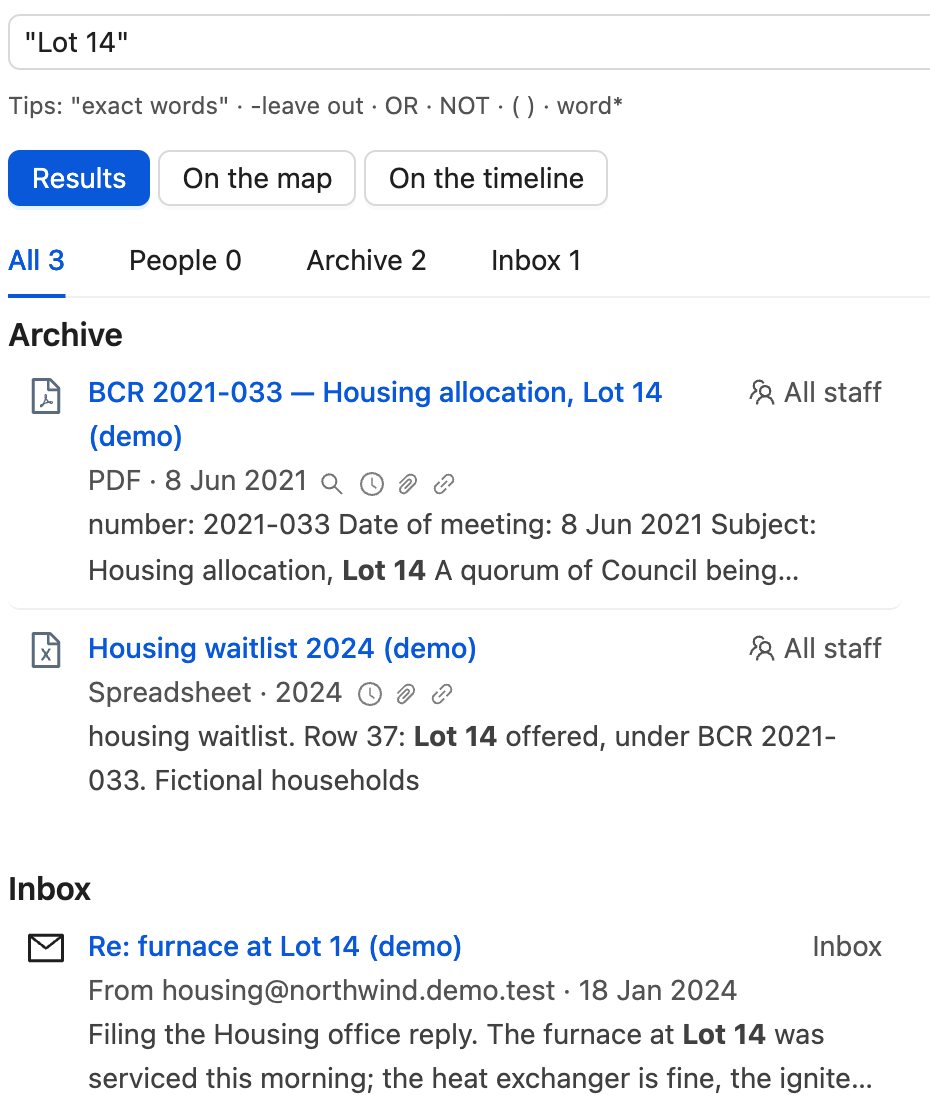
Search everything at once
Type a word. SovereignD looks inside PDFs, Word files, spreadsheets, notes, emails and recording transcripts. Each result shows the line it matched, so you know it's the right one before you open it.
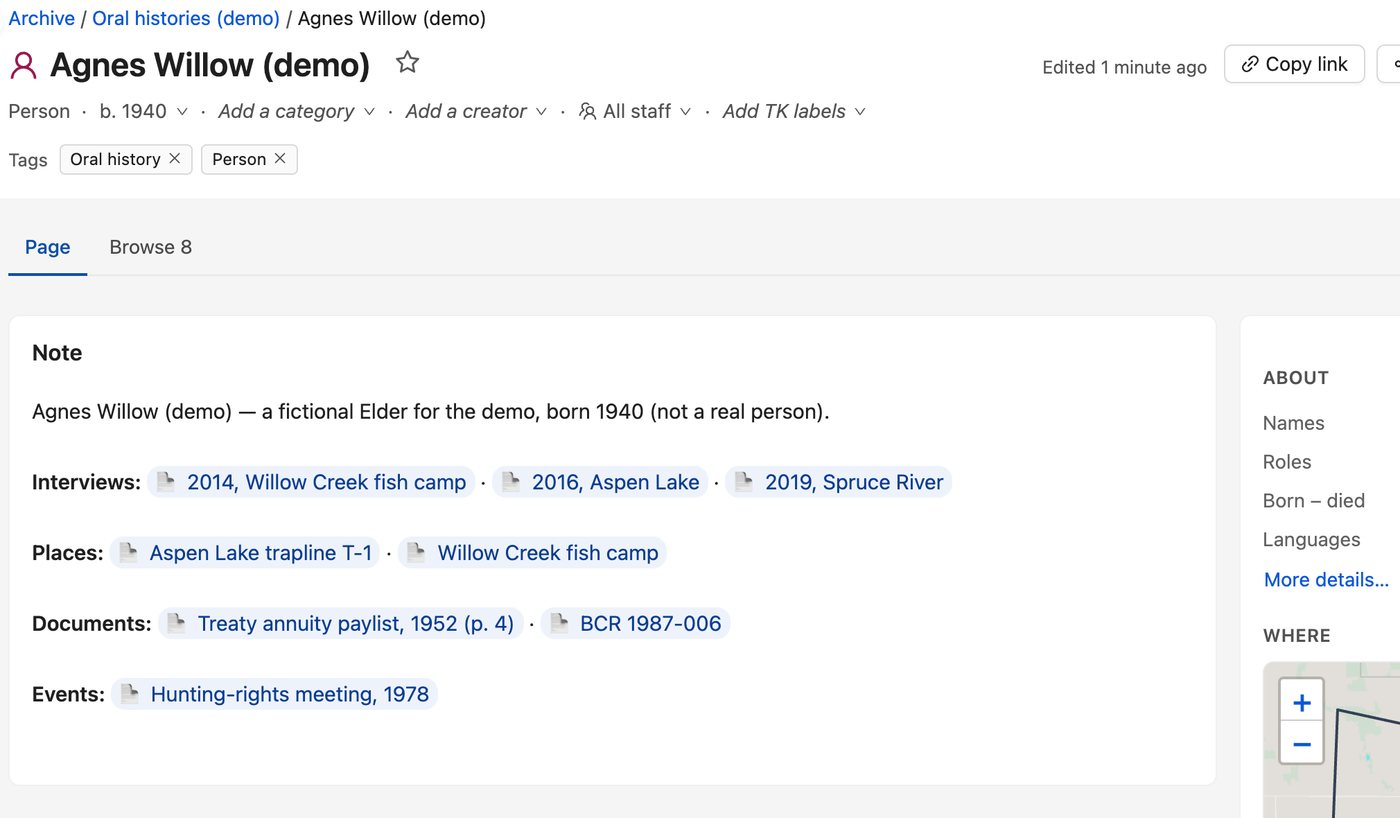
People, places and events, linked
Open an Elder's page and see their interviews, the places tied to them and the documents that mention them. Link them once, and the connections are there for the next person.
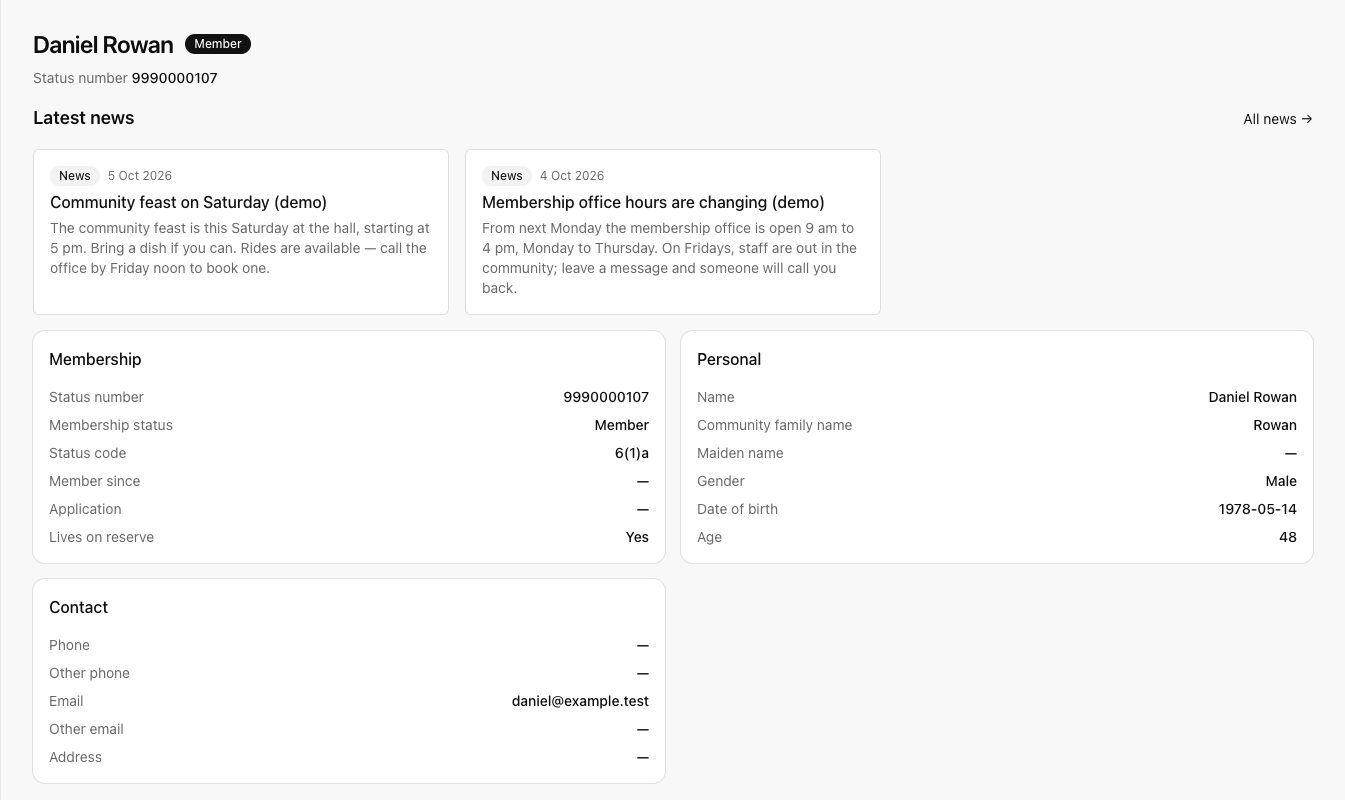
A member registry and portal
Keep your membership list in one place. Members sign in to see their own record, ask for changes and get documents the office shares with them.
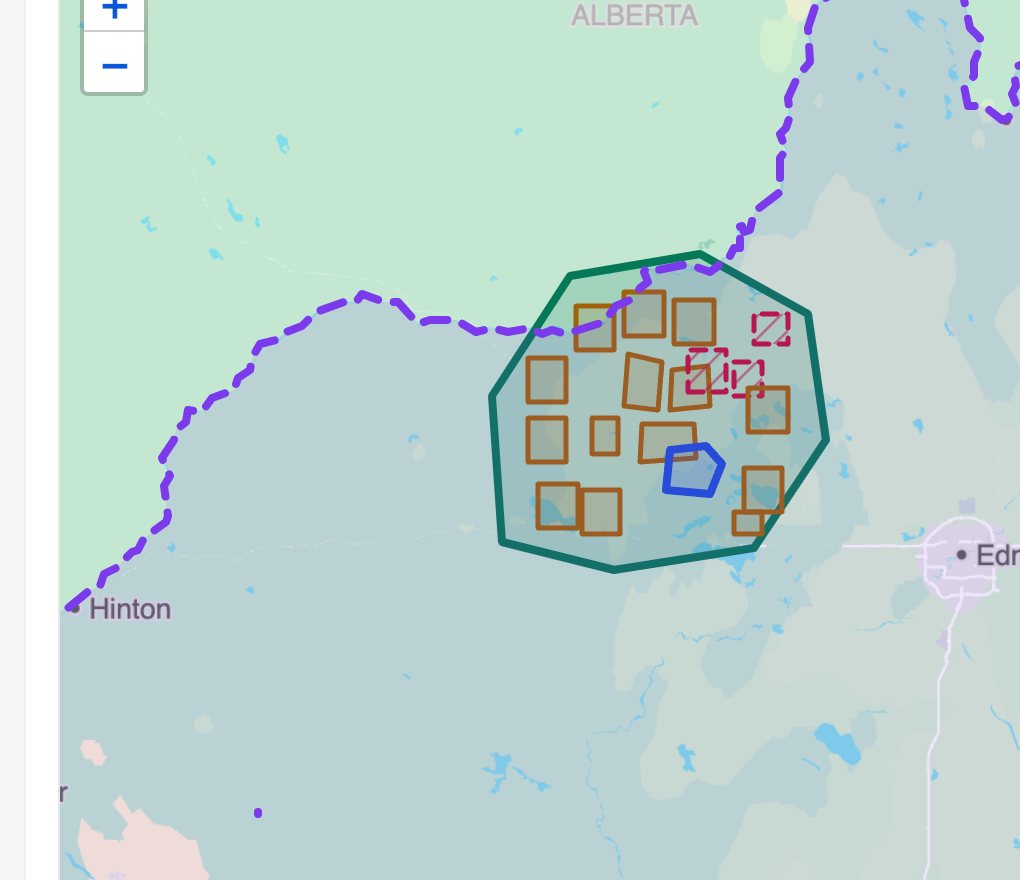
Your maps, your layers
Put your territory, traplines, reserve lands, treaty boundaries and the Province's proposed harvest blocks on one map. Turn layers on and off. You don't need GIS training to read it.
Also in the box
Email inbox
Forward or CC an email to SovereignD. It's filed with its attachments, and can go to a member's record.
Boards and tasks
Work through lists one at a time, like every member missing an email address.
A simple website
Build the Nation's public site from the same records. Post news and documents in a few clicks.
Access that respects protocol
Mark items as sacred or seasonal. Use TK labels. Record who viewed sensitive items.
The work
When staff change, the work doesn't start over.
The to-do lists, the steps and the reasons stay in the system, so the next person picks up where the last one left off.
Cleanup you can see shrinking
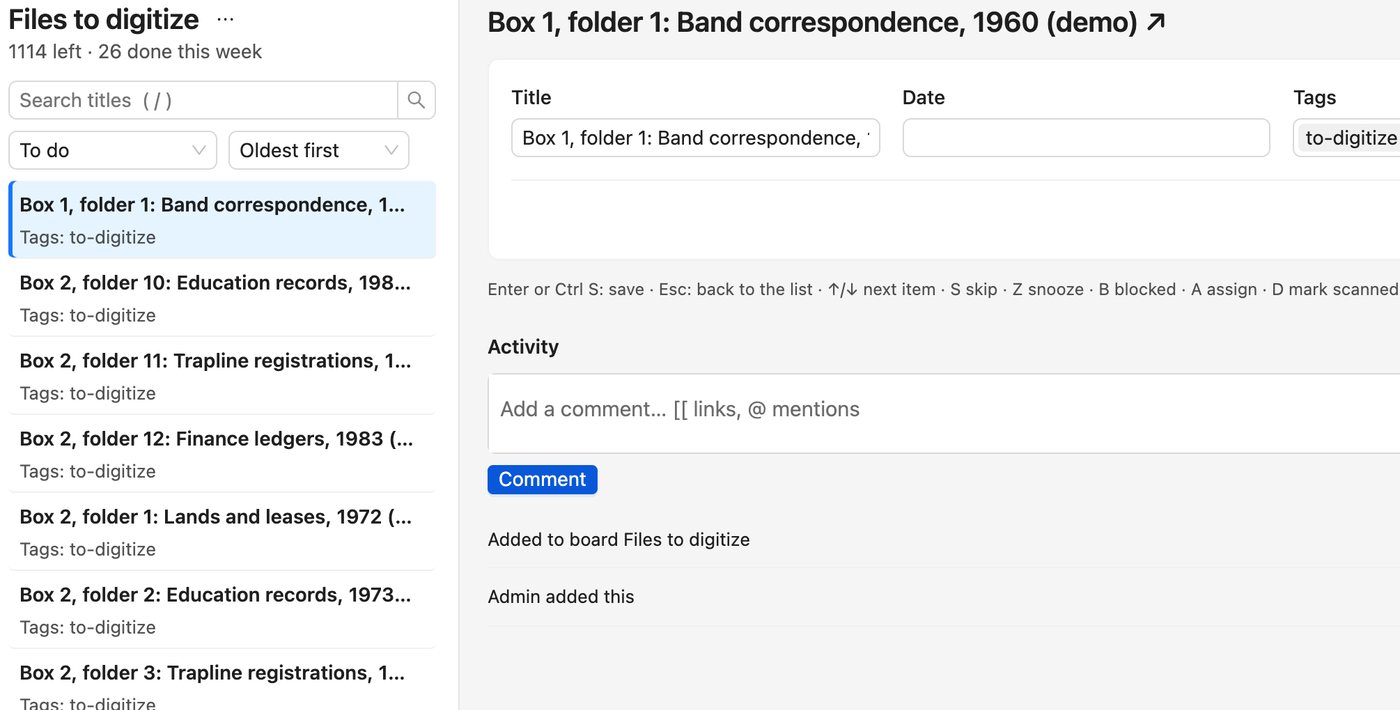
Some work never seems to end: parents missing from old records, boxes still to scan, members with no current address.
A burn-down list shows how much is left, and it shrinks as you go. Open the first one, fix it, press Next. Skip, snooze or hand it on.
No more "where's my file?" calls
Requests get lost in inboxes, and members call to ask where their application is.
On a board, each request moves through the same steps. Everyone can see who has it and what's stuck.
Membership applications
Received application 2
Needs documents 1
Waiting on Elders 1
Everyone sees why the work matters
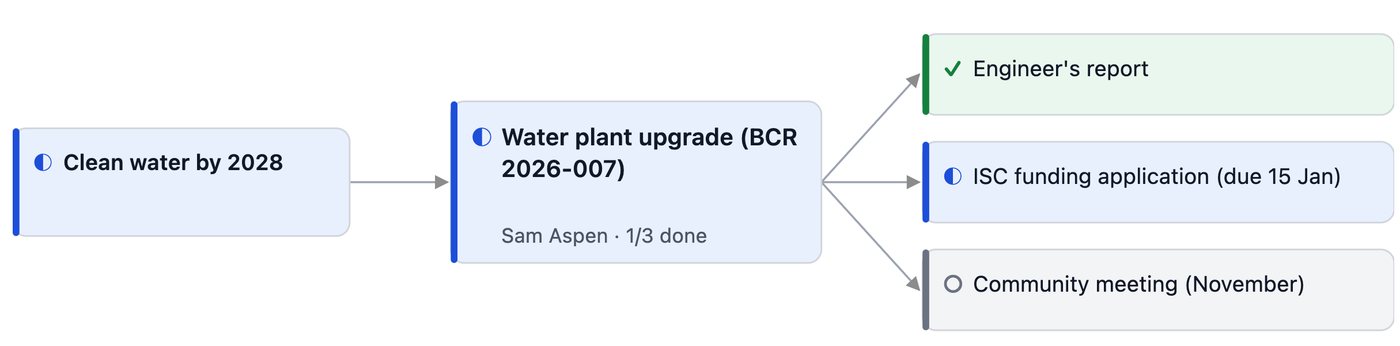
Council sets goals. Six months later, nobody's sure which projects serve them.
An alignment board shows each goal, the initiatives serving it and the steps under them, with owners and progress.
Sovereignty, in plain words
Your data stays with your Nation.
A lot of software says it's "secure". Here's what we mean, without the jargon.
- It lives in Canada.
- On your own server, or with a Canadian-owned hosting company. Not on a US company's cloud.
- Built to support OCAP® principles.
- Ownership, control, access and possession stay with the Nation. How we support data sovereignty. OCAP® is a registered trademark of the First Nations Information Governance Centre (FNIGC).
- The Nation owns it.
- We look after the system. We don't own what's in it, and we don't sell or share it.
- You can take it all with you.
- Export everything, any time, in files you can open without us.
- No price per person.
- A flat fee for your Nation, not a charge for every staff member or login.
Before you take it to council
Questions band offices ask us
What does it cost, and how do Nations pay for it?
A flat fee for your Nation, not a price per person. Many First Nations use ISC funding, like Band Support Funding or PIDP. We can help with the numbers for a funding application. How pricing works
We're a small office. Who sets it up?
We do. We set it up, move your records in and show your staff how to use it. You don't need IT staff.
What about our old files?
Spreadsheets and files from a shared drive can be moved in as part of setup. Paper and tapes need to be scanned first. We can talk through how.
Who can see sacred or private material?
Only the people your Nation names. Sacred items don't show up for anyone else, in search, on the map or in exports. For sensitive items, you can see who opened them. How protocols work
Our internet isn't great. Will it work?
It runs in a web browser, so it needs a connection. If your internet is unreliable, it can run on a server in your own building, so staff in the office can keep working when the outside line is down.
What if we stop paying?
Your data stays yours. Export all of it, any time, in files you can open without us. No lock-in